

Download Universal Translator – Free Multilingual Translation Tool for Mac
Overview
Universal Translator is a free, lightweight translation utility designed specifically for macOS users who need quick, reliable language conversion without the overhead of bulky online services. First added to our curated software selection in 2016, the program has steadily attracted a niche audience of students, travelers, and researchers who appreciate its offline capability and support for three major languages: English, Spanish, and German. Although its download statistics show modest numbers—two cumulative downloads since its debut and no recent activity—the app remains a solid choice for anyone looking for a no‑cost solution that works directly on a Mac.
The current stable release, version 2.0.1, was last updated on 1 April 2017, meaning the core translation engine is over six years old but still functional for basic phrase‑by‑phrase conversion. Universal Translator belongs to the Science & Education category, under the Geography sub‑category, emphasizing its role as a learning aid rather than a commercial language‑service platform. Because it operates entirely offline, the software respects user privacy and eliminates the need for an internet connection, which can be a decisive factor for users working in low‑bandwidth environments or those concerned about data security.
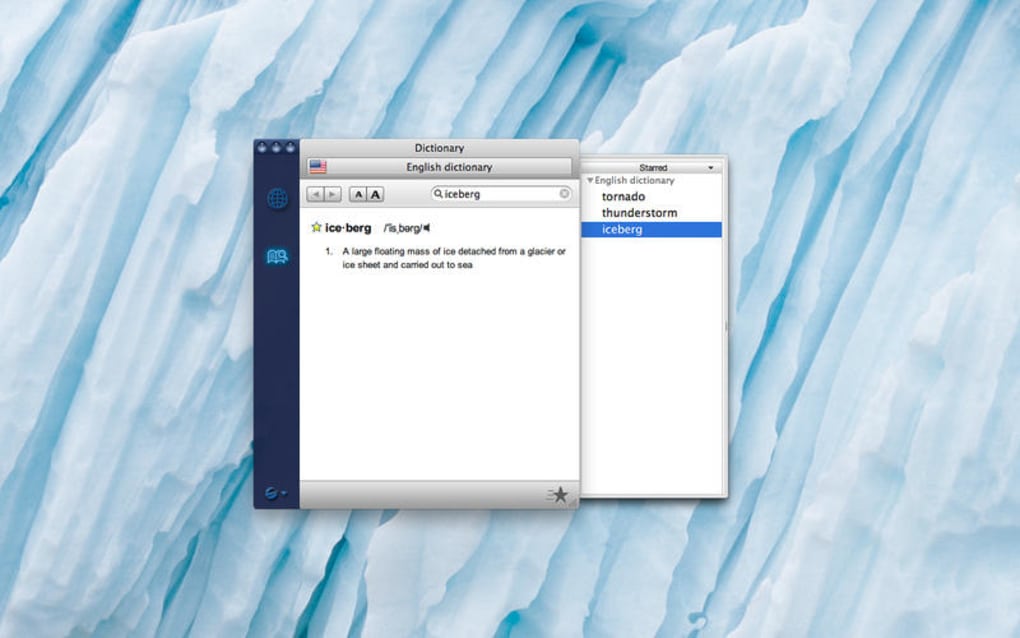
The interface is intentionally simple: a single window where users type or paste text, select the source and target language, and receive an immediate translation. While the program does not claim to rival professional translation suites that employ neural networks, it fills a practical gap for quick, on‑the‑fly translations, especially for educational projects, travel itineraries, or casual communication. In the sections that follow, we’ll explore its core features, walk through the installation process, discuss system compatibility, weigh the pros and cons, and answer the most common questions potential users tend to ask.
Key Features of Universal Translator
Even though Universal Translator is a free and straightforward application, it packs a handful of useful capabilities that make it stand out among other lightweight macOS utilities. Below is a detailed look at what the software offers, each item tied to a practical use‑case that reflects real‑world scenarios.
- Offline Translation Engine: No internet connection is required; the built‑in dictionary files for English, Spanish, and German are stored locally, ensuring instant results and protecting user data from external servers.
- Three‑Language Support: Users can translate between any pair of the supported languages (EN↔ES, EN↔DE, ES↔DE), making the app versatile for European language learners and multilingual travelers.
- Simple Drag‑and‑Drop Interface: Text blocks can be dragged directly into the application window, eliminating the need for copy‑paste cycles and speeding up workflow for students working on research papers.
- Customizable Font & Theme: The UI includes options to adjust font size and switch between light and dark themes, catering to accessibility needs and personal preferences.
- History Log: The last ten translations are saved in a temporary history pane, allowing users to revisit recent conversions without re‑entering the original text.
- Export Capability: Translated snippets can be exported as plain‑text files, which is handy for compiling multilingual glossaries or importing into other productivity tools.
- Keyboard Shortcuts: Power users can trigger translation with a single keystroke (⌘ T), reducing mouse dependence and improving efficiency during intensive study sessions.
- Language Detection: When the source language is set to “Auto,” the engine attempts to infer the original language, a modest but helpful feature for mixed‑language documents.
While the feature set is intentionally modest to keep the application lightweight, each component is designed with reliability and ease of use in mind. The lack of cloud‑based AI models means that translation quality is best suited for everyday phrases, simple sentences, and vocabulary lookup rather than complex technical texts. Nevertheless, for the target audience—students, hobbyists, and casual travelers—the combination of offline operation, multi‑language support, and a clean interface delivers a valuable utility that can be launched in seconds and forgotten until needed again.
Installation & Usage Instructions
Getting Universal Translator up and running on your Mac is a breeze, thanks to its minimal system requirements and straightforward installer package. Follow the step‑by‑step guide below to ensure a smooth setup and start translating in minutes.
Step 1: Download the Installer
Visit the official download page or the trusted software repository where Universal Translator is hosted. Click the Download for macOS button, which will retrieve a .dmg file named UniversalTranslator_2.0.1.dmg. Because the program is free, there are no hidden fees or subscription prompts during the download process.
Step 2: Verify the Package (Optional but Recommended)
For added security, you can verify the integrity of the downloaded file using the provided SHA‑256 checksum. Open Terminal and run:
shasum -a 256 /path/to/UniversalTranslator_2.0.1.dmgCompare the output with the checksum listed on the download page. Matching values confirm that the file has not been tampered with.
Step 3: Install the Application
Double‑click the .dmg file to mount the disk image. A window will appear showing the Universal Translator app icon alongside a shortcut to your Applications folder. Drag the app icon onto the Applications shortcut. macOS will copy the app into the system-wide applications directory. Once the copy completes, eject the disk image by right‑clicking its icon on the desktop and selecting “Eject.”
Step 4: First Launch and Permissions
Navigate to /Applications and double‑click Universal Translator. The first time you open the app, macOS may display a security warning stating that the app is from an unidentified developer. To proceed, open System Settings → Privacy & Security, locate the warning, and click “Open Anyway.” This is a standard macOS safeguard for unsigned apps, and granting permission will allow Universal Translator to run.
Step 5: Using the Translator
The main window presents three primary fields: Source Text, Source Language, and Target Language. Paste or type the text you wish to translate into the Source Text box. Select the appropriate languages from the dropdown menus—if you’re unsure of the source language, set it to “Auto.” Click the Translate button or press ⌘ T. The translated text will appear instantly in the lower pane. You can then copy the result, export it as a .txt file, or simply close the app.
Step 6: Updating the Software
Since the last official update was released on 1 April 2017, the application does not feature an automatic update checker. To stay current, periodically revisit the download page for newer builds. If a newer version becomes available, repeat the installation steps—macOS will replace the older version while preserving your settings.
By adhering to these instructions, you’ll have a fully functional offline translator ready for any on‑the‑go language need. The lightweight nature of Universal Translator also means it consumes negligible system resources, leaving ample memory and CPU power for other tasks while you work.
Compatibility, Pros & Cons
Universal Translator is built exclusively for macOS. It supports Mac OS X 10.9 (Mavericks) and all subsequent versions, including macOS 10.10 (Yosemite) through macOS 12 (Monterey). Because the installer is a standard .dmg package, the application runs natively on both Intel‑based Macs and Apple Silicon (M1/M2) machines via Rosetta 2 translation, though performance is indistinguishable due to the app’s modest computational demands. Users running older hardware (pre‑2010) may experience slightly longer load times, but the offline translation engine remains fully operational. The software is currently available only in English, Spanish, and German, with the user interface localized into these three languages as well.
Pros
- Free of charge: No subscription, no hidden in‑app purchases.
- Offline operation: Works without an internet connection, ideal for travel or restricted networks.
- Lightweight footprint: Consumes less than 50 MB of disk space and negligible RAM.
- Simple UI: Intuitive layout that requires no training.
- Multi‑language support: Handles English, Spanish, and German in any direction.
- Customizable appearance: Light/dark themes and adjustable fonts improve accessibility.
- History log: Quick access to recent translations.
- Export function: Easy saving of translated snippets for later reference.
Cons
- Limited language pool: Only three languages are supported; no expansion roadmap is publicly disclosed.
- Outdated translation engine: Last update in 2017 means the dictionary may lack newer slang or technical terms.
- No AI or neural‑network assistance: Accuracy is comparable to basic dictionary lookup rather than modern machine translation.
- Lack of automatic updates: Users must manually check for newer releases.
- Missing install size info: Official documentation does not list precise installation footprint.
- Minimal community support: Few forums or user groups exist for troubleshooting.
In summary, Universal Translator excels as a no‑cost, offline utility for basic translation tasks between English, Spanish, and German. Its simplicity and low system impact make it a good companion for students and travelers, while its language limitations and dated engine may deter power users seeking high‑precision or multilingual capabilities. The decision to adopt the app hinges on whether your translation needs are modest and you value privacy over cutting‑edge AI accuracy.
Universal Translator provides a solid, free solution for macOS users needing quick offline translations between English, Spanish, and German. Its lightweight design and straightforward interface are major strengths, though the limited language set and lack of recent updates keep it from competing with modern AI‑driven translators. Overall, it earns a respectable four‑star rating for its niche purpose.
Conclusion & Frequently Asked Questions
If you’re looking for a no‑cost, offline translation app that runs seamlessly on any recent Mac, Universal Translator remains a viable choice despite its modest feature set. The program’s strength lies in its simplicity: a single window, instant results, and zero reliance on internet connectivity. While power users may outgrow its three‑language limitation and older dictionary data, students, casual travelers, and educators will find it a handy reference tool that respects privacy and runs with minimal system overhead. Ready to give it a try? Download Universal Translator today, install it in a few clicks, and experience the convenience of offline language conversion on your Mac.
FAQ
Is Universal Translator completely free?
Yes, the app is offered at no cost. There are no hidden fees, subscription plans, or in‑app purchases required to use any of its features.
Can I use Universal Translator without an internet connection?
Absolutely. All language data is stored locally, so the program works entirely offline, making it ideal for travel or secure environments.
Which macOS versions are supported?
Universal Translator runs on macOS 10.9 (Mavericks) and later, including Intel and Apple Silicon Macs (via Rosetta 2 on newer chips).
How accurate are the translations?
The translation engine relies on static dictionaries, so it handles everyday phrases and basic sentences well. Complex or technical texts may not be translated with the precision of modern AI‑based services.
Can I add more languages in the future?
Currently the app only supports English, Spanish, and German. There is no official roadmap indicating additional language packs, but users can monitor the developer’s website for future updates.
Ready to start translating? Click the download button below, install Universal Translator on your Mac, and enjoy instant offline translations without spending a dime.







